
GetVoidedRecords
NoteQuery performance depends on the volume of data retrieved within the selected time frame. Using Submitted Date Types and narrower date ranges can improve performance, but may exclude relevant data. Choose your date range carefully to balance speed and completeness.
Summary
The GetVoidedRecords function retrieves voided record-level data based on the parameters provided. Each row in the result set represents a single record.
The values will be determined by the date range provided using the following parameters:
- Date Type (Required)
- Time Zone Offset (Required)
- Start Date (Conditional)*
- End Date (Conditional)*
- Minutes Ago (Conditional)*
- Form Name (Optional)
- Form Query Type (Optional)
- Location Name (Optional)
- Resource Name (Optional)
- Request Identifier (Optional)
Note:*Start Date + End Date or Minutes Ago must be provided to build the date range query. All other optional values a null value can be provided; see examples below.
For more detail on the parameters see the full list of descriptions here.
function (TableType as text, FormName as text, FormQueryType as text, DateType as text, TimeZone as number, StartDate as datetime, EndDate as datetime, MinAgo as number, Location as text, Resource as text, RequestIdentifier as text)Invoking the Function
Here is an example of invoking them using Power Query or through the visual editor.
With Date Range:
GetVoidedRecords("Submitted", 0, #datetime(2023, 6, 21, 0, 0, 0), #datetime(2023, 6, 22, 0, 0, 0), null, null, null)
GetVoidedRecords("Modified", 0, #datetime(2023, 6, 21, 0, 0, 0), #datetime(2023, 6, 22, 0, 0, 0), null, "HC-Test Form", "FormName")
GetVoidedRecords("Processed", 0, #datetime(2023, 6, 21, 0, 0, 0), #datetime(2023, 6, 22, 0, 0, 0), null, "HC-Test", "FormLike")
With Min Ago:
 GetVoidedRecords("Submitted", 0, null, null, 1440, null, null)
 GetVoidedRecords("Modified", 0, null, null, 1440, "HC-Test Form", "FormName")
 GetVoidedRecords("Processed", 0, null, null, 1440, "HC-Test", "FormLike")
Note:You can fill out the function parameters and click Invoke to create the table automatically. See example below.
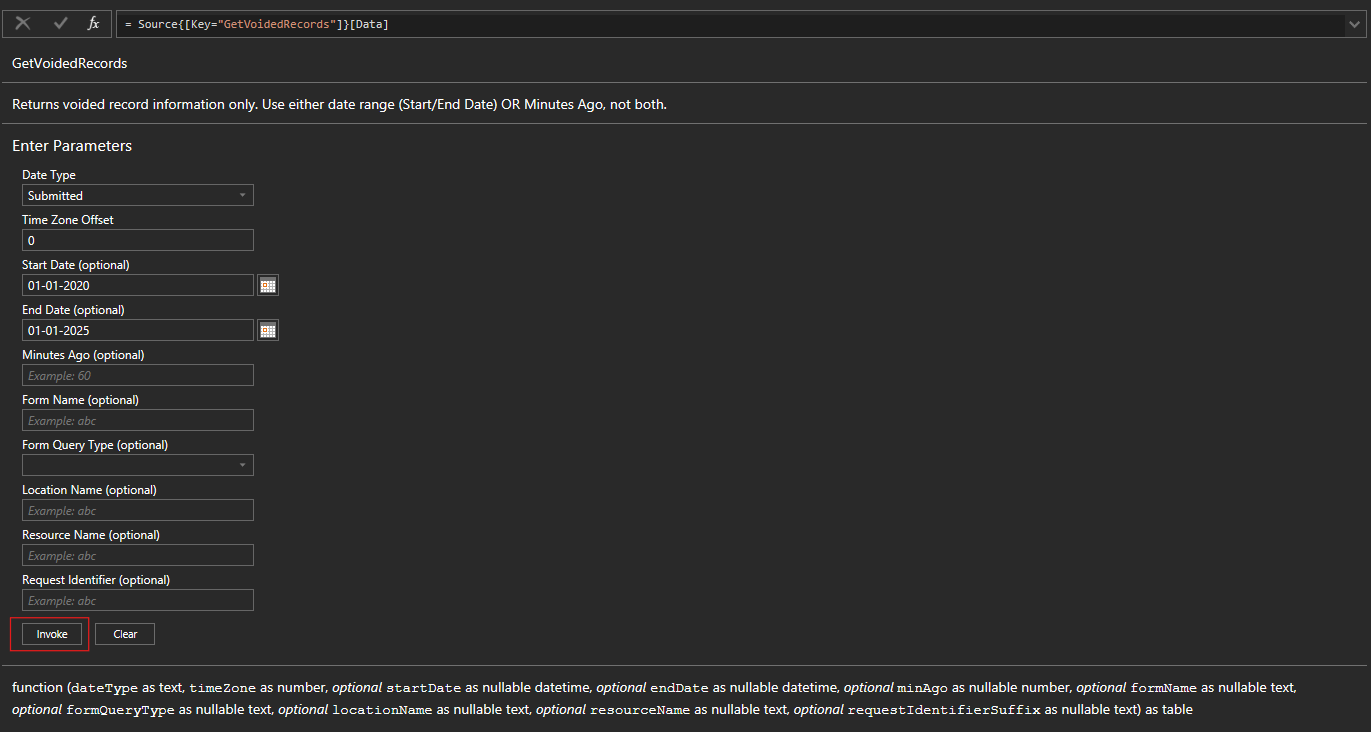
GetVoidedRecords Results

| RecordNumber | RecordCompliance | SubmittedDate | LocationName | FormName | FormVersion | ResourceName | ResourceType | ResourceId | SubmittedUserName | IsSigned | IsComplete | Comment | SubmittedTimeZone | ProcessedDate | RecordId | ModifiedDate | ModifiedUserName | VerificationList | ImageList | Row |
|---|---|---|---|---|---|---|---|---|---|---|---|---|---|---|---|---|---|---|---|---|
| 1513 | TRUE | 2020-03-18T22:48:00 | Los Angeles, CA | 00 Keyboard Block Issue | 7.0 | OMF Flite Bars, Wear Pads and Bolts | Equipment | a84630f0-5211-45dc-8d03-7be08d97e32e | kstanwyck | FALSE | FALSE | America/Los_Angeles | 2020-03-18T22:48:47 | 6896e2f1-ebb6-4a13-8292-75dc3d7f9301 | 2020-03-18T22:48:47 | kstanwyck | null | null | 1 | |
| 1519 | FALSE | 2020-03-23T17:38:39 | Los Angeles, CA | Sugar Log Example | 1.0 | Cane Sugar - Coarse | Items | e002a49d-8e0b-4eb0-bdbe-226e1145ddbe | NMartinez | FALSE | FALSE | US/Central | 2020-03-23T17:38:39 | 7e42a7a4-6f7b-4dc5-80c2-b48d93c4fabf | 2020-03-23T17:38:39 | NMartinez | null | null | 2 | |
| 1570 | TRUE | 2020-04-14T15:23:50 | Green Bay, WI | QC Finished Product Check Test | 4.0 | Resource1 | Items | 48ae31b4-d54c-4f96-9aea-fd54dfd86d5a | NMartinez | TRUE | FALSE | US/Central | 2020-04-14T15:23:50 | 4af7202c-305b-494b-b425-9e0b3316b7cc | 2020-04-14T15:23:50 | NMartinez | [List] | null | 3 | |
| 1654 | FALSE | 2020-06-02T05:18:36 | Green Bay, WI | 00 SPC TEST | 6.0 | Item13 | Items | d62fc614-363d-48cf-a3a0-67090bed6638 | SuperAdmin | FALSE | FALSE | Etc/GMT | 2020-06-02T05:18:36 | fd10e2f2-7567-4a7d-a9bb-146ba338d61c | 2020-06-02T05:18:36 | SuperAdmin | null | null | 4 | |
| 1660 | TRUE | 2020-06-04T13:09:36 | Green Bay, WI | aaa | 4.0 | Salterd SWEET | Equipment | 3c4f7d3d-58d8-4ffe-aa44-11580fb12434 | NMartinez | FALSE | FALSE | Etc/GMT | 2020-06-04T13:10:46 | 20493cc4-efd8-4b42-a566-83b907e60113 | 2020-06-04T13:10:46 | NMartinez | null | null | 5 |
The following field columns will be outputted in a table.
#table({
  "RecordNumber",
  "RecordCompliance",
  "SubmittedDate",
  "LocationName",
  "FormName",
  "FormVersion",
  "ResourceName",
  "ResourceType",
  "ResourceId",
  "SubmittedUserName",
  "IsSigned",
  "IsComplete",
  "Comment",
  "SubmittedTimeZone",
  "ProcessedDate",
  "RecordId",
  "ModifiedDate",
  "ModifiedUserName",
  "VerificationList",
  "ImageList",
  "Row"
}, {})
Formatting Column Data Types
Tip:Once the table is created, you may format the columns as needed. Select Transform-> Detect Data Type.
For example, you may choose to set ProcessedDate, ModifiedDate, and SubmittedDate as datetime fields (see the Power Query example below).

Table.TransformColumnTypes(Source,{{"RecordNumber", Int64.Type},{"SubmittedDate", type datetime},{"ModifiedDate", type datetime},{"ProcessedDate", type datetime}})
Updated 7 months ago